 Waida Studio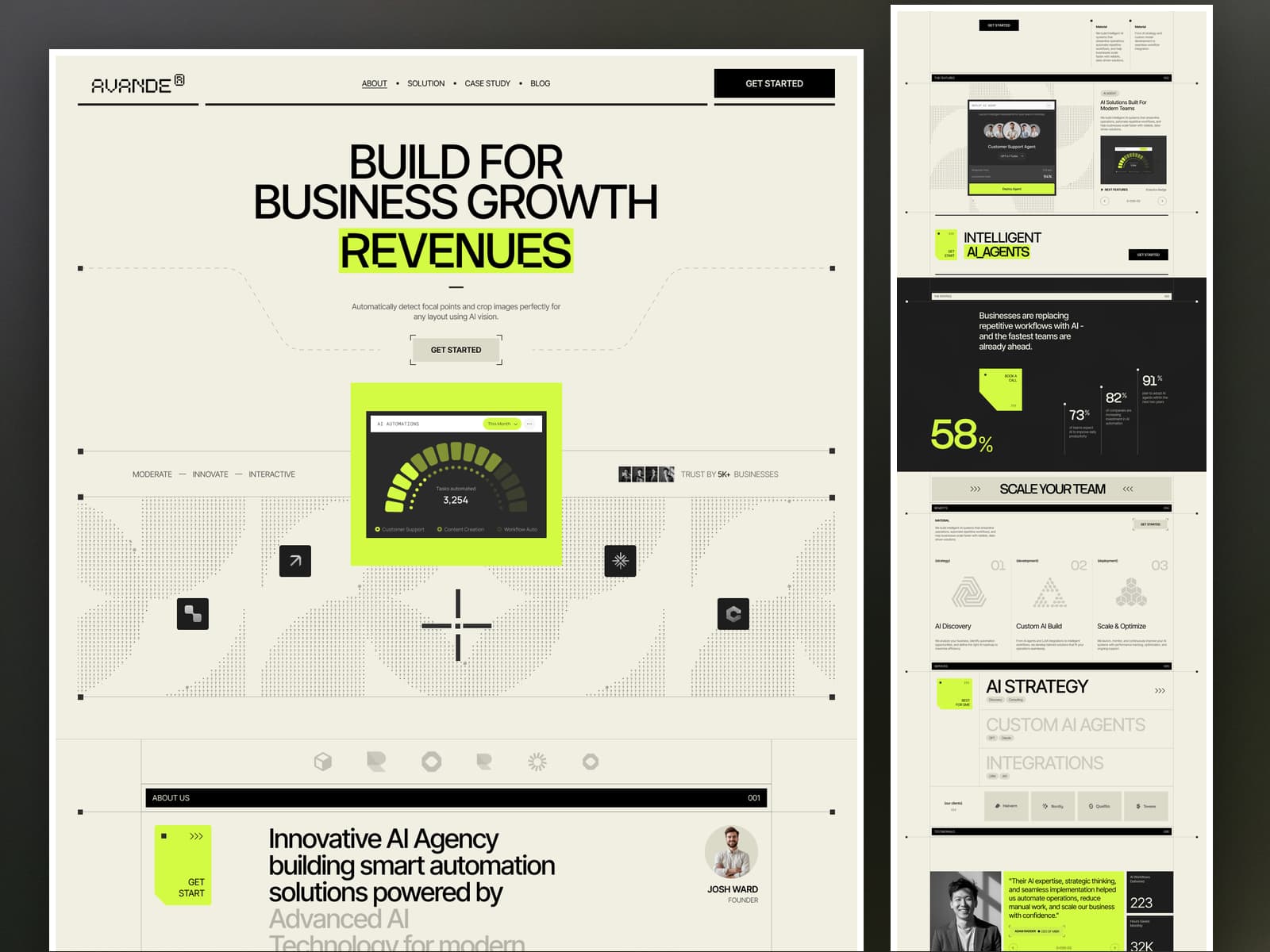
Every business now wants AI, and most of them do not know where to start. An agency that builds AI agents and automated workflows has to make an abstract service feel concrete: what it automates, how the work is done and what it delivered. Avande opens with exactly that — a bold "Build for Business Growth" headline, a live-looking automation dashboard, and the numbers businesses care about. Built on the Next.js 16 App Router with React 19 and TypeScript in strict mode, it ships 16 page templates covering 26 fully static pages, with the solutions, case studies and articles driven by MDX files you edit directly. No CMS or backend required.
Whether you run an AI automation agency, an AI consultancy, a workflow automation practice or a technology studio, Avande gives you every page the pitch needs — four solution pages with strategy figures and key benefits, three case studies with a four-step story and four headline results each, six full-length articles, and monthly and yearly pricing with a full comparison table. Content lives in files: add a solution and it appears on the solutions page and at its own URL without touching a component.
Tech Stack
Next.js 16 — App Router, every page prerendered to static HTML at build time
React 19 — server components throughout, with one small client island for the interaction layer
TypeScript — strict mode, `npm run typecheck` clean
Hand-crafted CSS — one plain stylesheet driven by CSS custom properties, no utility framework and no build-time CSS pipeline
Self-hosted webfonts — Inter Tight and Stack Sans Notch as woff2, no third-party font requests at runtime
MDX content layer — gray-matter frontmatter with a Markdown parser that renders into the design's own markup
Zero animation libraries — no jQuery, no GSAP, no Lenis: the letter-by-letter titles, the scroll reveals, the dashboard gauges, the sliders and the smooth wheel scroll are one TypeScript file
Included Pages and Templates
Core pages
Home with an automation dashboard hero, client logos, an about statement that darkens as you scroll, a feature slider with a rolling counter, statistics, benefits, three solutions, testimonials, process tabs, two articles, monthly and yearly pricing, gauges that fill bar by bar and an FAQ accordion
About with the team, the vision, the capabilities, the approach and client testimonials
Pricing with monthly and yearly plans and a full comparison table
Contact with a labelled enquiry form, under a dark header
Solutions
Solutions index with the benefits, and 4 solution pages: AI automation, custom AI agents, integrations and AI consulting, each with strategy figures and four key benefits
Case studies
Case study index with testimonials, and 3 case study pages: the strategy, the build and the results, with four headline numbers each
Blog
Blog index and 6 full-length articles covering workflow automation, AI agents, LLM integration and sales operations
Utility pages
Style guide, instructions, licenses, changelog, a 401 password-protected page and a 404 page
16 page templates. 26 static pages.
Easy Content Editing
Everything you change lives in `src/content/`. Edit a file, rebuild, done.
`src/content/solutions/*.mdx` — the 4 solutions: the title, the tags, the strategy figures, the key-benefits statement, the four benefits and the card pictures
`src/content/case-studies/*.mdx` — the 3 case studies: the tags, the headline, the four steps, the four results, and the card and banner pictures
`src/content/blog/*.mdx` — the 6 articles: the headline, the category, the card and banner pictures, and the body
`src/content/layout.json` — which articles and solutions the home page features
Every card reads the item's own entry, so a retitled article is retitled on the blog index, on the home page and under every other article at once — with no component to touch.
Article bodies are Markdown: headings, sub-headings, paragraphs and full-width pictures. A parser places each block inside the design's own markup, so the words stay editable and the layout stays exact. Reach past that grammar and the build stops and names the file, rather than rendering something the design has no styling for.
Theming is one file. Every brand colour, font, spacing step and type size is a CSS custom property in the `:root` block of `public/assets/css/styles.css`. Change a value there and it propagates across every page.
Verified Against the Original
All 26 pages were compared against the original template tag for tag, attribute for attribute and text run for text run — in the body and in the head. The stylesheet is the original, with one rule added so the style guide's alphabet specimen wraps on the smallest phones, and every page was swept for horizontal overflow from 320 to 1920 pixels wide with the menu open. The header, footer and closing call to action, and 459 copies of three repeated primitives, are components that render the original markup exactly.
Performance and SEO
Every page prerendered as static HTML, ready for a CDN
Per-page title, description and Open Graph and Twitter card metadata
Absolute share-image URLs so link previews resolve
Self-hosted fonts with `font-display: swap` and zero third-party requests
Lazy-loaded imagery throughout
Semantic markup with one H1 per page, real buttons and landmarks
Keyboard-reachable menu, accessible tabs with arrow-key support, FAQ rows built on real buttons
Full `prefers-reduced-motion` support, and readable with JavaScript off
Deployment
Deploys to Vercel, Netlify, Cloudflare Pages or any static host. `npm run build` prerenders every page; there is no server, no database and no API to configure.
What You Get
The complete Next.js 16 project source
16 page templates covering 26 static pages
4 solutions, 3 case studies and 6 articles as editable MDX
The original stylesheet and self-hosted webfonts
Full HTML documentation
Changelog and third-party license file
Requirements
Node.js 20 or newer
npm 10 or newer, or pnpm, yarn or bun
Highlight Bullet Points
26 static pages. 4 solutions. 3 case studies.
MDX solutions, case studies and blog.
Next.js 16. React 19. TypeScript. Fully static.